
Conditions reference
Conditions (the tests a branch runs against each comment) decide whether a Workflow branch matches. The condition types are:
- Keywords, Author and Platform — on every plan.
- Sentiment and Intent — Pro and above.
A condition type your plan doesn’t include is shown below the branch’s conditions as a locked row naming the plan that includes it, rather than in the Condition type dropdown.
Three answers up front, because they cover most questions:
- Case sensitivity: Keywords and Author matching is case-insensitive. “FREE” matches “free”.
- Partial words: Keywords and Author match on substring, not whole word. “win” matches “winning”.
- Regex: Not supported. No condition type accepts regular expressions. See Regex support.
A branch matches only when all of its conditions match — conditions are AND’d together. For how branches and Workflows are ordered and which one wins, see How workflows work.
Keywords
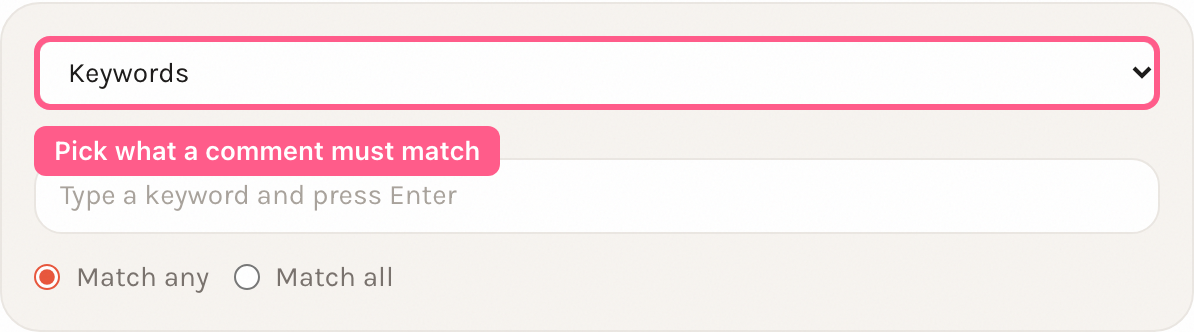
Section titled “Keywords”Matches when the comment text contains one or more keywords you list.
Matching semantics:
- Case-insensitive. Both the comment and each keyword are lowercased before comparison, so “Scam” matches “scam”.
- Substring, not whole word. A keyword matches if it appears anywhere in the comment text. “win” matches “winning” and “drawing”. There is no word-boundary option.
- Match mode. A radio control sets how multiple keywords combine: Match any (
any, the default) matches when at least one keyword is present; Match all (all) requires every keyword to be present. - Unicode and emoji. Case folding is Unicode-aware, so accented and non-Latin letters fold correctly (for example “É” matches “é”). Emoji and CJK characters match literally as substrings.
- No Unicode normalization. Composed and decomposed forms of the same character are not treated as equal. A keyword typed with a precomposed “é” (U+00E9) will not match a comment where the same letter is written as “e” + combining accent (U+0065 U+0301), and vice versa.
You add keywords one at a time — type a keyword and press Enter to turn it into a chip.
Match any fires because at least one keyword (both, here) is present. Flag hides the comment on-platform and sends a push notification. Reversible via Allow.
Edge cases:
- Empty keyword list. A Keywords condition with no keywords always matches. It never blocks a branch — the branch behaves as a catch-all for that condition.
- Substring surprises. Because matching is substring-based, short keywords match inside longer words. “ass” matches “class” and “assist”. Use longer, more specific keywords to avoid false matches.
- Match all is strict. With Match all, a comment missing even one of the listed keywords does not match.
Author
Section titled “Author”Matches on the comment author’s name, as the platform reports it.
Matching semantics:
- Case-insensitive substring. The condition matches when the author’s name contains the text you enter, ignoring case. The in-app helper reads: “Matches authors whose name contains this text (case-insensitive).”
- Single pattern. You enter one text value, not a list.
- Which name. Each comment stores one author name, and what it holds depends on the platform. On Facebook and YouTube it is the commenter’s display name (for example
Jane Doe). On Instagram it is the commenter’s username, stored without the leading@(for examplejanedoe).
DM me for wholesale prices
On Instagram the author name is the username, and "promo" is a substring of "daily_promo_deals" (case-insensitive), so the branch matches.
Edge cases:
- Empty pattern. An Author condition with no text always matches.
- Substring only — no wildcards, no
@. The match is a plain, literal substring test. The field placeholder shows examples like"john*"and"@johndoe", but neither*nor a leading@means anything special — both are matched as literal characters. Enteringjohn*looks for the literal textjohn*, which will rarely match. And because Instagram usernames are stored without the@, entering@johndoenever matches an Instagram commenter. Enter the plain text you expect to appear in the name (for examplejohnorjohndoe). - One name per platform, not both. A Facebook commenter is matched only on their display name, and an Instagram commenter only on their username. To catch the same person on both, add the text that appears in each — or use two branches.
Platform
Section titled “Platform”Matches when the comment came from the selected platform.
Matching semantics:
- Exact match, not substring. Unlike Keywords and Author, Platform is an exact equality check against the comment’s platform (case-insensitive on ASCII letters). It does not do substring matching. The one exception is the Facebook family: Facebook and Facebook (Business) count as the same platform, so a Platform condition set to either matches comments from Pages connected through both.
- Choose from enabled platforms. You pick the platform from radio tiles showing the platforms enabled for your setup.
Love this post!
The comment is from Instagram, so the condition matches. A Facebook comment would not match this branch.
Edge cases:
- Empty platform. A Platform condition with no platform selected always matches.
- Use Platform to scope by network. Combine a Platform condition with other conditions (they are AND’d) to run workflows only on, say, Instagram comments.
Sentiment
Section titled “Sentiment”Matches when the comment’s detected sentiment equals the sentiment you choose and the detection confidence is at or above your threshold.
Matching semantics:
- Sentiment value. Choose one of positive, negative, or neutral.
- Confidence threshold. A “Confidence threshold” slider (0–100) sets the minimum confidence. The condition matches only when the detected label equals your chosen sentiment and confidence is at or above the threshold. The in-app helper reads: “Matches comments with the selected sentiment when confidence is at or above the threshold.”
- Where the sentiment comes from. If a sentiment label and confidence were already computed for the comment, those are used. Otherwise the comment text is analyzed on the spot by an internal keyword-lexicon analyzer.
This is the worst service I have ever used. Total scam.
The comment reads as negative above the 70 threshold, so the branch matches and flags it for review.
Edge cases:
- Empty sentiment. A Sentiment condition with no sentiment selected always matches.
- Threshold trade-off. A high threshold reduces false positives but misses borderline comments; a low threshold catches more but risks mislabeling. Tune it against your own comments.
- Exact label match. The detected label must equal your chosen sentiment exactly. A “neutral” comment does not match a branch set to “negative”, regardless of confidence.
Intent
Section titled “Intent”Matches when the comment’s classified intent equals the intent you choose and the classification confidence is at or above your threshold.
Matching semantics:
-
Intent value. Choose one of seven values:
- Purchase question — pre-sale: price, availability, sizing, “does it come in blue”
- Support request — post-sale: order status, returns, something broken
- Complaint — dissatisfaction, with or without a specific request
- Spam — promotional, bot-generated, or a bare link-drop
- Feedback — praise or a suggestion, no action wanted
- Brand mention — talks about the brand but doesn’t address it directly
- Off topic — classified, and it’s about something else entirely
There is an eighth, internal state — Unknown — that you cannot select. Unknown means the classifier looked at the comment and couldn’t decide; it isn’t a business condition, and a rule built on it would fire on every classifier outage rather than on anything a customer actually did. If you want a catch-all, leave the intent value unselected (see Empty intent below) instead of trying to target “unclassified.”
-
Confidence threshold. A “Confidence threshold” slider (0–100) sets the minimum confidence. The condition matches only when the classified intent equals your chosen value and confidence is at or above the threshold — same rule as Sentiment’s threshold.
The confidence scale is coarse, and 70 is its floor. Confidence comes from how many signals in the comment point at the intent, so it takes a small number of values rather than a smooth 0–100 range. A comment classified at all scores at least 70; more signals push it to 80, 85, 88 and up. That means a threshold of 70 admits everything the classifier was willing to label — which is why 70 is the default — and anything above 70 excludes the two-signal comments, which are the common case. Set it to 80 if you want only strongly-signalled comments; leave it at 70 otherwise.
How much does this cost, and is it in stock?
Three purchase signals — “how much”, “cost”, “in stock” — put this well above the 70 threshold, so the branch matches and can route it to an automated or drafted reply.
Edge cases:
- Empty intent. An Intent condition with no value selected always matches — same rule as every other condition type, including Sentiment.
- Unclassified comments do not match — this is where Intent differs from Sentiment. Sentiment falls back to analyzing the comment on the spot when no stored sentiment exists. Intent does not: there is no on-the-spot re-analysis. A comment with no stored intent classification simply does not match any Intent condition, regardless of which value or threshold you configure.
- Intent rules are forward-only. Because there is no fallback, an Intent condition can only match comments received after Intent classification was enabled on your account — older comments were never classified and never will be retroactively. The condition editor shows the cutoff date next to an Intent condition; if a Workflow with an Intent condition doesn’t seem to fire on comments from before that date, that is expected, not a bug.
- Exact label match. The classified intent must equal your chosen value exactly. A comment classified as “Feedback” does not match a branch set to “Complaint”, regardless of confidence.
Regex support
Section titled “Regex support”Regex is not supported. No condition type accepts regular expressions. There is no regex condition type, and Keywords and Author treat everything you enter as literal text (case-insensitive substring). Special characters such as *, ., (, and \ have no special meaning — they are matched as literal characters.
To approximate patterns, use several keywords with Match any, or use shorter substrings (remembering that matching is not whole-word).
How conditions combine
Section titled “How conditions combine”Within one branch, all conditions must match — they are AND’d. Add a Keywords condition and a Platform condition to the same branch, and the branch matches only comments that satisfy both.
A branch with no conditions always matches, acting as a catch-all. To understand which branch and which Workflow ultimately fires when several match, see How workflows work.
Related
Section titled “Related”- How workflows work — branch and Workflow ordering, first-match-wins, and how conditions combine.
- Actions reference — what Flag, Allow, Delete, Reply, and the other actions do.
- Testing workflows — preview which branches match a comment before going live.
Check out my FREE giveaway 🎉 link in bio!