
Actions reference
Actions are what a branch does when its conditions match a comment. This page lists every action in the order they appear in the Action type dropdown, what each does on Meta (Facebook and Instagram), whether it can be undone, who gets notified, and how it shows up in your logs.
Actions run seconds after a comment arrives (roughly one second to evaluate, then up to about ten seconds to carry out on Meta). If a workflow is in observe-only mode, its actions are simulated: they are recorded in the log but never sent to Meta. Only the highest-priority matching workflow fires for a given comment, so only that branch’s actions run.
Which actions cost you anything
Section titled “Which actions cost you anything”Unlimited moderation, pay for the work. Your plan meters the automations that reach a follower in your name — and the ones where the AI model runs on your behalf. Defensive actions are free at any volume, so no amount of spam can run your allowance down:
| Never counts toward your allowance | Counts toward your allowance |
|---|---|
| Flag (the hide) | Reply |
| Delete | Private reply (DM) |
| Allow | Send message |
| Promote | Like |
| Reply with AI |
An AI draft is an automation. Reply with AI used to be free on the grounds that it drafts text and sends nothing — but the model still ran, and running it is the work you are paying for. So it costs exactly one automation, whether the rule drafted it for your review or you pressed Generate AI draft in the composer yourself, and whether or not you go on to send what it wrote. Never two: if you send the draft, the send is the send’s own cost. A generation that fails — the provider is down, or times out — costs nothing at all.
Two more rules cover everything else. Anything you do by hand from the Inbox is never metered, and a workflow running in observe-only mode bills zero at any volume — it simulates its actions and sends nothing. Metering also lands only when the platform accepts an action, so a reply blocked by an expired token costs nothing.
For the allowances, the rates, and what happens when you reach them, see How automation billing works.
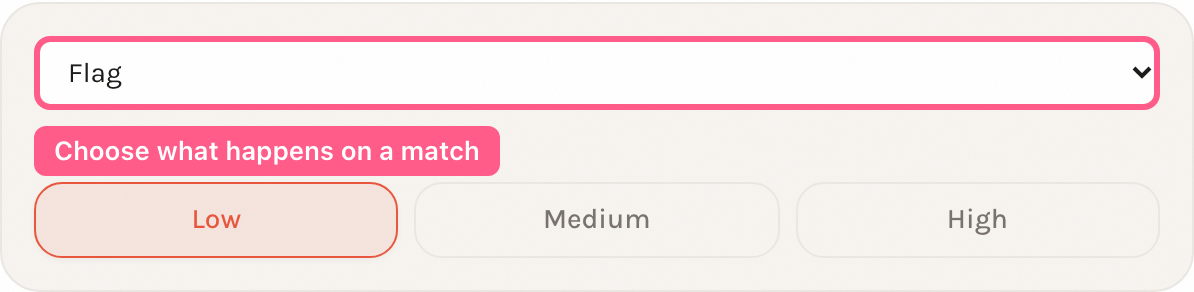
Flag hides the comment on Meta and sends you a notification. On Facebook the tool sets is_hidden=true; on Instagram it sets hide=true. Flag has one setting, Severity (Low, Medium, or High), which labels the flag for triage but does not change what happens on-platform.
Flag also sets the comment’s status to Flagged.
Who gets notified: you do. Flag fires a push notification. Turn workflow-match notifications on or off under Settings → Notifications.
How it appears in the log: the comment’s status becomes Flagged (find it in the Inbox under the Flagged filter), and the action is written to the Audit Log (Analytics → Audit Log) with the workflow name and action type.
Flag hides the comment on Facebook and sends you a push notification. Reversible via Allow.
Allow marks the comment as Approved and takes no destructive action. On Meta it un-hides a comment that was previously hidden (it sets is_hidden=false on Facebook, hide=false on Instagram). Allow has no settings.
Who gets notified: no one. Allow does not send a notification.
How it appears in the log: the comment’s status becomes Approved (Inbox → Approved filter), and the action is recorded in the Audit Log.
Promote
Section titled “Promote”Promote records the action but makes no change on Meta and has no settings. It is an internal signal only; nothing is hidden, deleted, or posted. It also leaves the comment’s status as it was — a promoted comment is not marked Approved or Flagged.
Where a promoted comment shows up:
- On the comment in the Inbox, as an automation chip naming the Workflow that promoted it.
- In Analytics → Audit Log, as a Promote entry, and in the Promoted This Month card there.
- In your webhooks, as a
comment.promotedevent, if you have a webhook subscribed to it — the way to send promoted comments to another tool.
Who gets notified: no one.
How it appears in the log: the action is recorded in the Audit Log with the workflow name; no platform effect is sent.
Reply posts a public reply to the comment using a text template you write. The template can include the variables {{author}}, {{comment}}, and {{platform}}, which are filled in when the reply is sent. This is a real post to Meta.
Who gets notified: the comment author sees your reply on the post.
How it appears in the log: the reply is recorded in the Audit Log with the workflow name and action type.
Reply with AI
Section titled “Reply with AI”Reply with AI generates a reply instead of using a fixed template.
The first setting, What happens when this fires, is the one that matters. Two of its three choices post to the public thread with nobody reading the reply first:
| Choice | What it does |
|---|---|
| Draft it for review — nothing is sent | The reply is generated and waits in Inbox → Held until a person sends, edits or discards it. Nothing reaches the platform on its own. This is what a new action starts on. |
| Write a reply and send it automatically | The model writes the reply and it is posted, unattended, in your name. |
| Fill in my template and send it automatically | The model fills in your Reply Template and the result is posted, unattended, in your name. |
The other settings shape the text: Tone (Friendly, Professional or Empathetic), Length (Short, Medium or Long), and — for the template choice — the Reply Template itself.
Who gets notified: the comment author sees the reply on the post when one is sent.
How it appears in the log: the action is recorded in the Audit Log with the workflow name.
What it costs: one automation per generation — see Which actions cost you anything. This is charged when the model runs, not when a reply is sent, so a draft you never send still costs one and a generation that fails costs none. Sending a held draft from Inbox → Held costs nothing extra: you did that, not the automation.
Private reply (DM)
Section titled “Private reply (DM)”Private reply (DM) sends a direct message to the comment’s author instead of replying in public. It is only available for Facebook and Instagram. The action tile shows the policy chips 7d, 1/comment, and fb·ig:
7d— the private reply can be sent only within 7 days of the comment being posted. After that, Meta no longer allows it, and no message is sent.1/comment— one private reply per comment. Once a private reply has been sent for a comment, no second one is sent for it.fb·ig— Facebook and Instagram only.
If the workflow isn’t scoped to a Facebook or Instagram page, the tile is locked with the message: “Private reply is only available for Facebook or Instagram. Scope this workflow to a Facebook/Instagram page to enable it.”
Who gets notified: the comment author receives a direct message.
How it appears in the log: the message is recorded in the Audit Log, and the direct message appears in the Inbox under the DMs tab. Automated DMs carry an “Auto-replied by workflow” badge.
Send message
Section titled “Send message”Send message replies in an existing direct-message conversation: when someone messages your Page or Instagram account, the Workflow can answer them in that thread. Like Private reply, it is Facebook and Instagram only, and it needs the DMs channel turned on in the Workflow’s scope — the tile says so if it isn’t. Its policy chips are 24h, 1/message, 750/h/account, and fb·ig:
24h— the reply must go out within 24 hours of the person’s message. That is Meta’s messaging window.1/message— one reply per incoming message.750/h/account— at most 750 sends per hour from each connected account. That is Meta’s own Send API rate limit.
Who gets notified: the recipient receives a direct message.
How it appears in the log: the message is recorded in the Audit Log and appears under the Inbox DMs tab and in outbound messaging.
Like likes the comment on Meta. It has no settings. Like is not supported on TikTok, where the dropdown shows it as disabled with the suffix “(TikTok unsupported)”.
Who gets notified: the tool sends no notification for a Like.
How it appears in the log: the action is recorded in the Audit Log with the workflow name and action type.
Delete
Section titled “Delete”In the editor, Delete is labeled destructive: “Irreversible action. This action permanently deletes the comment. It cannot be undone.”
That warning is real. On Facebook and Instagram, Delete removes the comment from the post on the platform — for you and for everyone else. Like every on-platform action, it runs only if the connected account granted the permission it needs; if it didn’t, nothing is removed and the Audit Log entry shows that the action did not run.
Who gets notified: the tool sends no notification for a Delete.
How it appears in the log: the action is recorded in the Audit Log with the workflow name and action type.
This product is garbage and so is everyone who buys it
Delete removes the comment from Instagram for good. If you might want it back, use Flag to hide it instead.
Check my page for a FREE giveaway!!! link in bio